Age Verification
This website contains age-restricted material including nudity and explicit content. By entering, you confirm being at least 18 years old or the age of majority in the jurisdiction you are accessing the website from.
I am 18+ or older - Enter
I am under 18 - Exit
Our parental controls page explains how you can easily block access to this site.

最后发帖 - 页数 1580

  论坛

Dorsai6
已加入 在 Apr 2013
3465 发布

VG on a 1440p Screen

关于iStripper的一切
March 12, 2017, 17 回复
I have 3 displays running on a 2013 Mac Pro. I don't do much gaming, so 60 Hz is fine for me. My main display is a 40" 4K Phillips BDM4065 (3840 X 2160). It's about 2 years old now. My second display is a 30" HP LP3065 (2560 X 1600). It's about 6 years old and was my main display before I got the 4K. My third display is a 23" HP LV2311 (1920 x 1080). It's about 4 years old and replaced a smaller display the failed.

All three of my displays have about the same number of pixels per inch so images have about equal crispness. If you had a smaller 4K display, images would look sharper because of more pixels per inch. My wife really likes her 27" retina iMac for just that reason. It's a 5K display in just 27", effectively twice the pixels per inch.

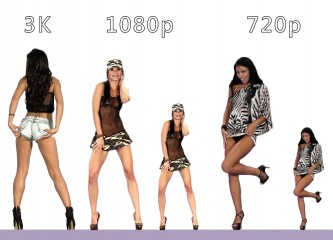
I've done a lot of experimenting with iStripper on all three displays. When you display a card larger than it's nominal size you get some blurring and pixelation. The more you enlarge the card the worse it gets. I normally play cards at 60% on my 4K display. The 3K cards look great and the 1080p cards are a bit blurry, but acceptable. As a point of reference a 3K card at 45% on the 4K display is at it's nominal resolution. Anything larger is being scaled up. When I play 720p cards I only play them at 30% because to me they look terrible at 60%.

On a 1440 display a size of about 65% will produce nominal resolution for a 3K card.

I once did some experiments with my 4K display in portrait mode. The 3K cards were a little fuzzy at 80% but the size was awesome. The 1080p cards were ***** at 80%.

The net result of my experiments is that I seldom watch 720p cards. When I do it's in small mode. The old 480 cards are even worse. When I watch them its at about 20% - ten tiny girls.

On my Mac, iStripper seems to calculate image size based on the size of my main display regardless of which display is showing the card. When I ***** a card from one display to another, there is no apparent change in size. Remember that the pixels per inch of all three of my displays are about the same.

Hope this helps.
IceCold007
已加入 在 Dec 2008
250 发布
stefnev1
主持人
已加入 在 Jul 2008
17580 发布
stefnev1
主持人
已加入 在 Jul 2008
17580 发布
TheEmu
已加入 在 Jul 2012
7424 发布

Dancers' ages?

关于iStripper的一切
March 11, 2017, 13 回复
@Number6 - I agree with you about Ava Courcelles, Its odd that no age appears when looking at her cards because its in the xml files, all seven of them give her age as 33 as you had deduced.

Here are the cards which, according to their xml files, have performers aged 31 to 34. Again I have left out the VirtualGirl Classic cards for which the ages are suspect. I also have not yet downloaded the latest 62 cards (because of the network connection I am currently using) so there might be a few in those as well.

Age 34
d0040, d0050, d0076, d0058, d0192,
d0204, d0208, d0239, d0289

Age 33

a1401, a1402, a1403, a1404, a1405, a1406,
d0038, d0041, d0065, d0103, d0111, d0116,
d0117, d0119, d0123, d0128, d0151, d0157,
d0168, d0187, d0189, d0209, d0221, d0226,
d0238, d0241, d0264, d0274, d0286,
e0014, e0015, e0016,
e0611, e0612, e0613,
f0027, f0028,
f0030, f0031

Age 32

a0521, a0522, a0523, a0524, a0525, a0526,
a1319, a1318, a1320, a1321, a1322, a1322,
a1500, a1501, a1502, a1503, a1504,
d0010, d0035, d0042, d0054, d0089,
d0092, d0093, d0099, d0110, d0139,
d0166, d0170, d0175, d0180, d0186,
d0198, d0205, d0211, d0217, d0222,
d0231, d0228, d0248,
f0013, f0014,
f0016, f0017

Age 31

a0479, a0480, a0481,
a1115, a1116, a1117,
a1118, a1119, a1120,
d0008, d0027, d0039, d0046, d0049,
d0059, d0062, d0064, d0069, d0075,
d0080, d0086, d0088, d0091,
d0095, d0097, d0098, d0106,
d0124, d0127, d0132, d0135, d0137,
d0143, d0159, d0163, d0164, d0165,
d0169, d0181, d0190, d0195, d0196,
d0207, d0212, d0216, d0223, d0235,
d0255, d0299,
e0470, e0471, e0472, e0473,
e0554, e0555, e0556,
e0592, e0593, e0594, e0595,
f0171, f0172, f0173

TheEmu
已加入 在 Jul 2012
7424 发布

Discussions for Scenes for Version 1.2.X Fullscreen Mode here

关于iStripper的一切
March 11, 2017, 5111 回复
@DrDoom9 - The black water is, presumably, because gl_Color is comming through as all zeros which will multiply all the coulr compontents by zero resultng in a transparent black area. I thought the default was all ones which leaves things unchanged but on thinking it over the rule must be a bit more complex. Add a

color : 1, 1, 1

to the clip sprite as well as uncommenting the opacity : 0,5 clause.

Reflections or shadows of frontTable clips are a problem because the legs, and sometimes more, in the original clip are often below its built in "hotspot" so when you invert them the reflections are above the hotspot making them stick up in the air and shadows are offset if you have applied any rotations.
It is possible to mask them, but can be tricky depending on the scene. To use a simple mask you need one that is opaque above where the performer is sitting and transparent below that point, you then order the scene elements so that the reflection is behind the mask, then the mask and finaly the performer. This will sometimes feel wrong because although the reflection needs to look like its front of the performer you have to put it behind her and even behind her immediate background.

I wish there was some easy way to specify that only a particular area of an image or clip is to be used, and I have a shader (Rectangle_XY) that will do exactly that, but to use it you usualy need to introduce an extra frame buffer to extract the area you want and then merge that into the final scene - with some ***** difficulties in getting things the right way up and positioned where you want them. I do not recommend using it until you are completely happy with using framebuffers and shaders. The few times I have tried to use it for this sort of thing I initialy could not find where the part I wanted ended up on the screen and I had to ***** it to be the front element, colour it red to make it stand out, fiddle with its position until it was roughly where I wanted it, figure out why the numbers I used put it where it was and only then could I calculate the exact values to use. The numbers always made sense in the end, but the combinations of scale factors and offsets meant I never got it right first time.

At some point I intend to create a general purpose shadow shader, one that transforms the image shape by using a combination of shear and taper transforms rather than only using rotations, performs a blur, changes the color and opacity, allows the shadow grow more indistinct as it gets further from the feet and maybe even to handle shadows falling partly on a horizontal floor and partly on a vertical wall - but it will be probably be some time before I can provide it and something similar for reflections.

I am going to be away from my computer for most of today, but I may be able to look at your scene tomorrow. If just adding the color: clause does not work can you zip it up and put it somewhere that I can download it from.