Age Verification
This website contains age-restricted material including nudity and explicit content. By entering, you confirm being at least 18 years old or the age of majority in the jurisdiction you are accessing the website from.
I am 18+ or older - Enter
I am under 18 - Exit
Our parental controls page explains how you can easily block access to this site.

Последние сообщения - Страница 1637

  Форум

DrDoom9
Присоединился в Dec 2008
463 Сообщения

Discussions for Scenes for Version 1.2.X Fullscreen Mode here

Всё о iStripper
20 December 2016, 5111 Ответы
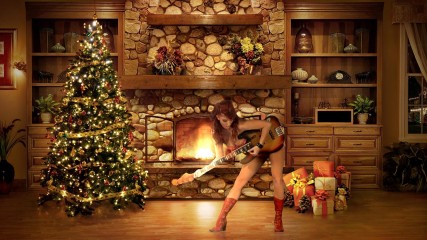
There is a lot of OpenGL programming in the xmas scene that I really do not understand at all. I have no experience of framebuffers, uniform parameters, or shader coding. Is there anywhere I can go to learn?
As I have mentioned in a previous post, the xmas scene does not correct the orientation of the clipSprite. This means that clips where the model has writing on clothing or on tattoos appear as mirror images.
I tried to correct this simplistically by seting the x scale parameter negative on the clipSprites, but I found that the lighting created by the fire on the model was inappropriate. In the end I had to mirror the whole scene, with the tree now on the right of the screen. Here is the altered code:

//------------------------------ main scene
sprite {
size: 2200, 1080
scale: -1, 1, 1 // correct symmetry
pos: 0,0 // see half window rear left, half picture rear right
//pos: 100,0 // shifted x by +100 to see all window rear left, no picture rear right
source: colorClip,0 // clip, full size
source: fbo2,1 // blurred light mask
source: fboNormalBackground,2 // background
shader: combine_light.fsh
blend: false
}

//------------------------------ model reflect
clipSprite {
scale: -1.0, 0.9, 1.0 // correct symmetry
pos: -100, 500 // see half window, rear left, half picture rear right
//pos: 0, 500 // shifted x by +100 to all window rear left, no picture rear right
standingHeight: 800
rot: 180, 0, 0
source: ClipBm
opacity: 0.3075
}

I would have thought adding additional dancers might give strange unnatural effects from the 'fire-glow'.
It's just too clever stuff for me!
dolphins109
Присоединился в Feb 2011
1834 Сообщения
stefnev1
MODERATOR
Присоединился в Jul 2008
17607 Сообщения
stefnev1
MODERATOR
Присоединился в Jul 2008
17607 Сообщения
stefnev1
MODERATOR
Присоединился в Jul 2008
17607 Сообщения
readyforanything
Присоединился в Apr 2011
5037 Сообщения
readyforanything
Присоединился в Apr 2011
5037 Сообщения
stefnev1
MODERATOR
Присоединился в Jul 2008
17607 Сообщения
stefnev1
MODERATOR
Присоединился в Jul 2008
17607 Сообщения
stefnev1
MODERATOR
Присоединился в Jul 2008
17607 Сообщения
mark7772
Присоединился в Dec 2012
131 Сообщения
mark7772
Присоединился в Dec 2012
131 Сообщения
mark7772
Присоединился в Dec 2012
131 Сообщения
Number6
Присоединился в Oct 2010
3682 Сообщения

iStripper version 1.2.148 is available to download!

Всё о iStripper
18 December 2016, 83 Ответы
@all

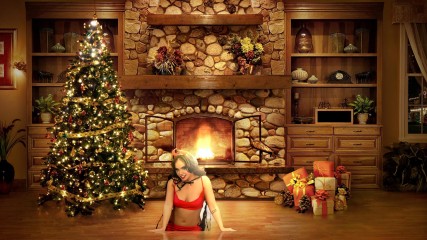
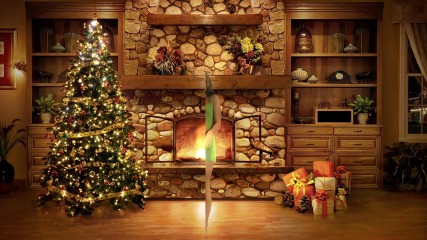
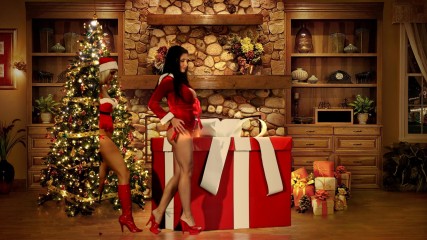
With regards to the coding of the scene it is a very fine balance as to what works and what doesn't work and I have attached some screencaps to illustrate this. I modified the script to enable certain things the "programmer" disabled in the scene and I think this shows why they were disabled.

Firstly I have seen some comments about some accessories being disabled. The first cap shows that accessories (in this case the guitar) have not been generally disabled. If you have a clip with an accessory that doesn't work then it is something else that it is disabling it from playing. Accessories need to be deliberately "allowed" or "denied". There is nothing in the scene that disables clips with accessories. This includes chairs, sofa's etc.

With regard to table clips the second screencap shows what can happen if the table clips are allowed. The girl appears to be coming up out of the floorboards.

With a lot of the older cards many of the standing scenes incorporate "inout" where the girl(s) enter from one side of the screen. Unfortunately this doesn't work very well with 3 K cards (NB it works fine in the desktop just not in full screen) and the third screencap demonstrates this. Finally even though "inout" generally works much better for older cards you can still get the situation where the model apears from thin air - as per the 4th screencap.

Apart from the first screencap, which does appear to work correctly and isn't "denied" in the programme all the other situations detract from the realism of the scene. This is not a bug in the programme but just the programmer trying to make the scene as realistic as possible.

As someone who has done one or two scenes in the past I can sympathise with the programmer on this one. Unfortunately it does end up with quite a lot of clips, on older cards particularly, not playing.

At the end of the day it is up to you. Fullscreen scenes can be easily edited using a text file editor (Notepad in Windows - not sure about the MAC) to remove table and inout from the "denied" clause in the scene. Just be aware that you can end up with unreal situations as per screencaps 2,3 and 4.

Thank you Totem for this scene. It contains a number of techniques I hadn't really looked at and will be exploring in the future.

Any day where you learn something new is never a ***** day ;-)
Previous Страница 1637 След.