Age Verification
This website contains age-restricted material including nudity and explicit content. By entering, you confirm being at least 18 years old or the age of majority in the jurisdiction you are accessing the website from.
I am 18+ or older - Enter
I am under 18 - Exit
Our parental controls page explains how you can easily block access to this site.

Последние сообщения - Страница 1102

  Форум

Number6
Присоединился в Oct 2010
3702 Сообщения

Controlling size inside fullscreen

Всё о iStripper
20 March 2019, 7 Ответы
@R2D34ever2

sittingHeight and standingHeight can both be used in the same scene (I have done it in many scenes).

As indicated the standingHeight controls Standing, Pole, Cage, Glass clips etc. The sittingHeight controls table clips only.

Please note that sittingHeight does not control standing clips where the girl may squat or kneel or lie down.

There are limitations in both. Some of the older clips still seem small when the standing height is set. If you increase it to accomodate this then with some of the newer clips the girls head can disappear off the top of the sceen.

Similarly with sittingHeight increasing it for older clips runs the risk of losing the girls head in newer clips if she kneels up.

Neither are perfect and one size doesn't always fit all, but they can work together.

Give it a try. You can't really break anything with it and as long as you save any changes with a new filename then you will not lose your original.

Please note also that if you are using multiple clips then you need to set the standingHeight/sitting Height for each clip when it is called in the scene. This can sometimes help when wanting to reduce the height of some clips to get some sort of perspective effect. If you look in Totem's Whisper Club multi girl scene, the pole clips' standingHeight is set at half of the main clip's standingHeight.

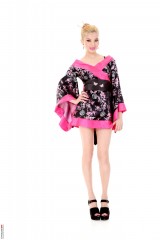
The screencaps have a standing height of 380, 400 and 420 repectively in the Background 2D scene.

Please be aware also that in that scene the camera size is set at 800 x 450 which automatically scales up to a 1920 x 1080 screen so even small changes to the standingHeight (or sittingHeight) in that scene can have quite a dramatic effect.

HTH
goodwolf
Присоединился в May 2011
623 Сообщения
Dorsai6
Присоединился в Apr 2013
3469 Сообщения

iStripper Playlist Manager from Dorsai6

Всё о iStripper
20 March 2019, 81 Ответы

Beta testers wanted

I've received some suggestions for improving the user interface of my Playlist Generator. This does not add new capabilities with regard to creating playlists, but it does (I hope) make it easier to select the cards and clips to be part of a playlist.

Here is what I've done:

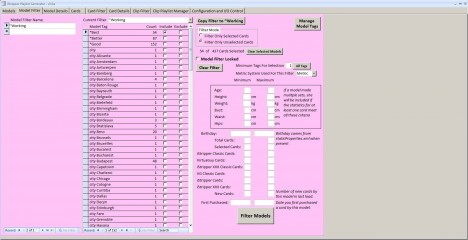
1. Models can now be tagged, sorted and filtered (selected) in the same way as cards.

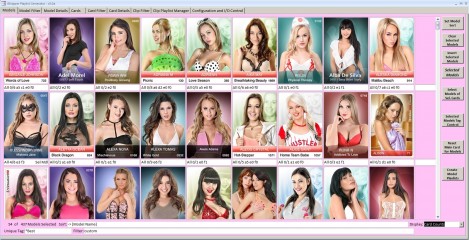
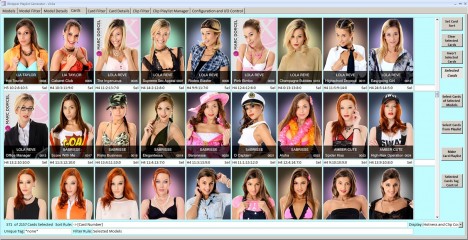
2. There are now two overview displays. Each looks something like the My Collection display in iStripper. One shows a single card image for each model. (You can determine which image is used). The other shows every card in your collection.

3. On the overview displays, you can either show all models/cards or just those that are currently selected.

4. On the overview displays, you can show one fact about the model/card much as the Girls Store in iStripper does. However, you have many more choices and you can control this display independently of the sort and filter settings.

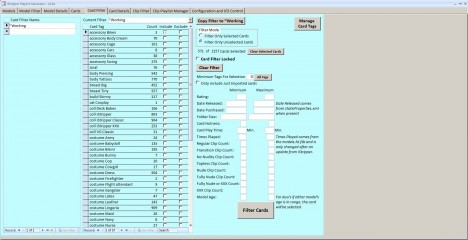
5. There are now separate filter tabs for models, cards and clips. While these provide many more capabilities than before, I hope they are easier to use and understand. In fact, this is the area where I most want feedback.

6. Tags can now be classified by source which should make importing and managing tags simpler.

7. Although Totem tags default to Totem's structure, that is most are part of "category" I have created an alternate more detailed organization with, for example, all costume tags in one category and all breast size tags in another.

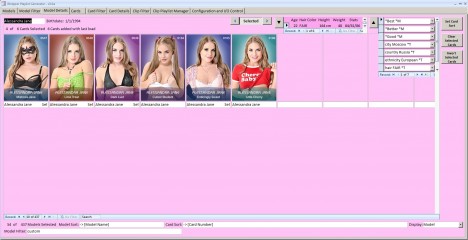
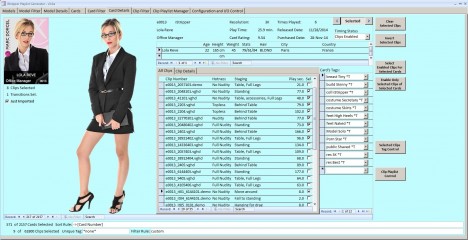
The attached screen shots show some of the primary tabs in the application. The data displayed in the Models tab shows the number and types of cards. The first number is the number of cards currently selected. The second is the total number of cards. The remaining number are by collection letter. The data displayed in the Cards tab shows the hotness level for the card and the number of clips by hotness level. Whether the card is currently selected is also shown.

Anyone willing to beta test this version, please let me know by PM. Include your email if I don't already have it. This version is not as thoroughly tested as previous ones. At this point I'm mainly interested in look-and-feel issues and ease of use.
readyforanything
Присоединился в Apr 2011
5037 Сообщения
readyforanything
Присоединился в Apr 2011
5037 Сообщения
readyforanything
Присоединился в Apr 2011
5037 Сообщения
spiderman1804
Присоединился в Feb 2008
1478 Сообщения

Ginebra Belluci Flash Flood

Всё о iStripper
19 March 2019, 102 Ответы
Old price system until October 2014.
All shows of the series Axxxx (VirtuaGirl), Cxxxx (DeskBabes) and Bxxxx (VirtuaGuy) were offered for the price of 2 credits (new 20 credits).
All shows of the Dxxxx series (VirtuaGirl Classic) were priced 1 credit (new 10 credits).

Since the end of October 2014, there is a new pricing system in which a discount is granted depending on the user status.
New were the shows with quality "Crystal Clear".
The basic prices depend on the quality level:
"low" (480p) for 1 credit
"medium" (720p) for 1.6 credits
"standard" (1080p) for 2 credits
"crystal clear" (3K) for 3 credits (later reduced to 2.5 credits)

With the iStripper version, the payment has changed. This change was not a price increase.
The basic prices depend on the quality level:
"low" (480p) for 10 credits
"medium" (720p) for 16 credits
"standard" (1080p) for 20 credits
"crystal clear" (3K) for 25 credits

The purchased credits were also converted accordingly.

###

There were different possibilities in the old price system not to pay the full price.
# Subscription for 1, 3 or 6 months
# Bosster packs with 10 shows on a theme (for example blonde or bikini)
# single random shows for the price of 1 credit (new 10 credits)

I'm not sure, but in the old VirtuaGirl software it could have been the possibility that a kind of calendar added a random show every day to be displayed there. If no subscription was active, then from the last 14 shows the show could be bought for a reduced price.
Previous Страница 1102 След.