Age Verification
This website contains age-restricted material including nudity and explicit content. By entering, you confirm being at least 18 years old or the age of majority in the jurisdiction you are accessing the website from.
I am 18+ or older - Enter
I am under 18 - Exit
Our parental controls page explains how you can easily block access to this site.

Letzte Beiträge - Seite 2071

  Forum

Wyldanimal
MODERATOR
Mitglied seit in Mar 2008
17696 Beiträge

Jessica Joy Update

Alles über iStripper
22. December 2013, 13 antworten
All of the Cards will be Offered in 3 reolutions.
You will select the one that Best Fits your Screen size at 100%, so there is no need to do on the fly re-sizing.

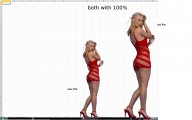
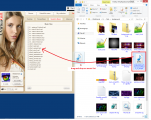
The sample Picture posted above, showed how on a 720P card, the Standing Size was TOO tall for a 720p Screen.

So depending on your Screen RESOLUTION (size makes no difference 21" or 120")
The Pixel resolution is what is important.

Standing size

720p - about 550 - 600px in Height
1080p - about 850 to 900px in height
3K - about 1400 - 1500px in height

totem has not published the 3K size - Soon....

The Task bar on your screen uses 40 to 80 px of height.
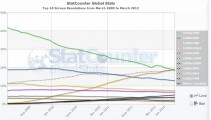
So on a 1024 x 768 or 1366 x 768 screen (70% of all users in the World have this size)
that leaves 688 px to display the card.

on a HD screens, 1920 x 10800, 1680 x 1050, 1280 x 1024
it leaves 944 to 1000px to display the card after you take away the taskbar height.


3K screen, 2880 x 1620 it leaves 1540px to display the card.

This makes Perfect sense to me - when you look at the screen size the card is targeted for.

720p - Standing height about 600 - Screen Space 688px - Clip Fills Screen at 100%

1080p - Standing height about 900 - Screen Space 944 to 1000px - Clip fills screen at 100%


3K - Standing height about 1500 - Screen Space 1540px - Clip fills screen at 100%

If you have a higher resolution screen - Get the 3K version, and then you will have to resize to fit your screen.

In 2014 to 2015 is predicted that 30% of computer users will update to Full HD screens.

So then the 1920 x 10800, 1680 x 1050, 1280 x 1024 screens will be the 60% to 70% of All Users for the Next 2 to 3 years.

Only 5% predicted to have 2k or Higher Screen size.
up to 10% by 2015

The 1080p Market, 1080p clips that FIT a 1080p screen is what totem must Target.

the 3k clips will only be 5% of the market.

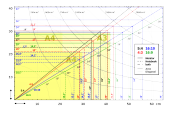
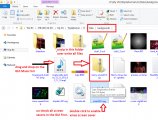
That 2nd picture is MOST common Screen Dimensions Using the 1024 x 768, 1366 x 768, 1280 x 800, 1440 x 900 resolution.
the Latter two comprise about 5% of Users.
So combined - This is 80% of ALL computer users in the World today.
Have a screen of these size / resolution.

There is STILL a big need for 720p size clips that fit 720p screen at 100% with no resizing needed.

Totem is making the right choice.

Simply Download the proper size for your screen.
Wyldanimal
MODERATOR
Mitglied seit in Mar 2008
17696 Beiträge

[VGHD] Addon: Custom card player

Alles über iStripper
22. December 2013, 408 antworten
Merry Christmas everyone...
I've created a SKIN, so to speak, for use with the old Strip Bar Screen Saver.

Please note: this uses the Already Installed Totem ScreenSavers.
If you Can't play The ScreenSavers, this won't fix or change that. Sorry...

But If you Can play the ScreenSavers, then this is something you might want to get and try.

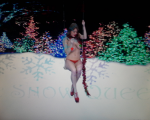
Two sample video's of my VG Xmas screen saver
My Site is not Designed for Streaming of Video.
So when the web page is displayed.right click a Blank area below the video, on the Page, and Save / Download and watch them.

www.deskbabes.net/xmas2013/xmas-swing.mp4
www.deskbabes.net/xmas2013/xmas-tree.mp4


The zip with all the screen saver goodies in it.
www.deskbabes.net/xmas2013/merry-xmas2013.zip

what's in it..
backgrounds, overlays, colored lights, music file, a favorite list for my player
a registry file so you can enable the screen saver
a read me file.

The Basics:
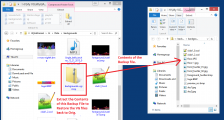
Download the Zip.
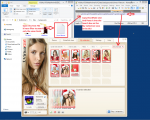
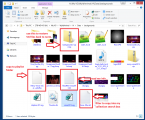
Copy it to your Data\Backgrounds folder
Unzip it in the same folder - Yes, Overwrite the existing files ( it has a backup of them )

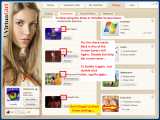
In the GUI, screen savers tab, uncheck all of the screensavers.

You have to Enable the Old Screen Saver.
In the Data Folder doubleclick on the file names xmas2013.reg
allow it to write the changes to the registry. (It enables the Screensaver)

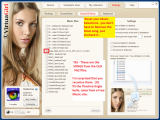
If you Want to hear the Music, ***** and Drop the Music File on to the GUI's music list.

I have a FavoriteList File so you can Load it into my player.
Copy it to the Data\playlist folder.
Then Open it with my player...
These are ALL of the XMAS CARD clips I tested and know work...
( you do need to have all the cards, or remove the clips that are from cards you don't own )

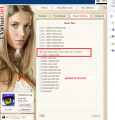
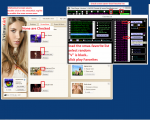
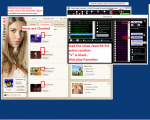
There is also a Filter File. Open it, Copy the Entire Line. Then Paste it in the My Collection Search Box.
It filters and displays all of the VG Xmas cards, 8 of them...


There is a readme-xmas2013.txt file Double click to open and read it.


Known Issues:
Does not Support 1080p size clips. please play only 720p clips.
Screen Savers were not designed for Swing Clips - but some will work..

The StripBar Screensaver was not designed to work with all of the TaskBar Clips, Ones where part of the Models body, goes Below the Top of the Task bar.
(Example: Sitting with Her Legs Over and In front of the Task bar.)
Or an Item or piece of clothing is dropped in front of the task bar.

The Technical part of it:
The Top of the Taskbar is the Zero line where the clip is positioned.
Above the Taskbar is Plus, and Below the Taskbar is Minus.

Each Clip is encoded with it's Max and Min size. ( the invisible BOX that fits around the entire Clip. ) If the Min value of that BOX is Negative, (below the taskBar)
then the ScreenSaver will NOT display the Animation file. and you get a Black Screen.
If you Have the Music option turned on, you will also Hear the Music play.

The Screen Saver doesn't have a Taskbar, so that type of Clip has No place to be displayed.

I believe this is one reason why Totem removed it, since many clips caused a blank Black Screen.

Members who have access to the List of Clips feature, can UnCheck these types of clips, and the Screen saver will work fine.

This is my Favorite Screen Save, the Strip Bar.
I watch most of my VG clips using this screen saver, and a custom Skin of sorts.