Age Verification
This website contains age-restricted material including nudity and explicit content. By entering, you confirm being at least 18 years old or the age of majority in the jurisdiction you are accessing the website from.
I am 18+ or older - Enter
I am under 18 - Exit
Our parental controls page explains how you can easily block access to this site.

마지막の글 - 페이지 #1449

  게시판

TheEmu
Joined in Jul 2012
7424 글

Discussions for Scenes for Version 1.2.X Fullscreen Mode here

iStripper에 관한 모든 것
October 23, 2017, 5119 답변
I will try the new version this evening.

@Z22

Don't bother with the in and out qualifiers for things declared at the start of fragment shaders. Fragment shaders can only have one output and this is the predefined variable gl_FragColor which, being predefined, does not need to be declared by you at all. Even if they could have other outputs there is absolutely nothing that could ever use these other outputs. Using "in" is redundant because it is the default and the only thing that can be a valid "out" is gl_FragColor. Things are different in vertex shaders, but we are only talking about fragment shaders here.

Everything else declared in a fragment shader but outside of its functions can only be either

1) inputs. which must be declared as either uniform or varying. Any input should have a value assigned to it by something that runs before the fragment shader otherwise it will just be zero.

2) Shader local variables which must not be declared as either uniform or varying. These will default to zero unless you assign them an initial value.

Note, every time that a fragment shader runs it gets a new set of these variables - if you give one a value it will NOT have that value in the next frame but will have been reinitialised.

If you try to import code from other sources please be aware that different systems will provide different sets of system specific uniform and varying global variables. You can rely on those begining with gl_ as those are specified by the GLSL language and must always be provided, everything else is system specific (such as the vUv variables that you have previously used). Within the iStripper system there are some of variables, such as u_Elapsed and u_WindowSize which are provided by Totem's code but if you are getting code from elsewhere that uses any uniform or varying variables other than the gl_ ones you will need to find out if iStripper provides any equivalents and if so what they are called.
Number6
Joined in Oct 2010
3706 글

Discussions for Scenes for Version 1.2.X Fullscreen Mode here

iStripper에 관한 모든 것
October 22, 2017, 5119 답변
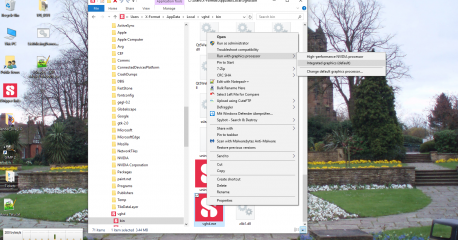
Question: How does anyone temporarily disable the NVidia GPU so that their rig resorts to intel GPU only as per @TheEmu's situation.? It stands to reason, if members cannot temporarily do that, surely they will never know whether anything is working to GLSL rules or not. Problems shouldn't be fractal but they seem to beget each other lol.

It depends on your set up. Many PCs now have the grahpics card built in and not necessarily INTEL. If you do not have a separate graphics card then you can only work with the onboard one. Usually you woulld have to go into the BIOS to enable/disable the onboard graphics if you have a separate graphics card. Many people would not have this option if they only have the one GPU. Mine is permanently disabled as my lowly AMD/ATI is far better then the the onboard graphics.

I suspect that @ThEmu has a laptop similar to my work laptop. It has dual graphics cards (mine is INTEL or AMD). It auto switches between the two dependent on the application. For high graphics usage e.g. AutoCAD in my case, it automatically uses the AMD.

I haven't looked at mine too closely (It is only used at work) but I am guessing there is a way to ***** it to use only one of the graphics processors. I have a feeling that @TheEmu did this a while back when there were some problems with some of the stuff he had done. Apparently it worked OK on one of his GPU's but other people were having problems. When he tried it on his other GPU it also exhibited problems. Now I think he tries everything on both GPU's just to be certain.
Number6
Joined in Oct 2010
3706 글

Discussions for Scenes for Version 1.2.X Fullscreen Mode here

iStripper에 관한 모든 것
October 22, 2017, 5119 답변
@Z22

Have you looked in your vghd.log?

The scene appears to work for me as per your screencaps and it is a nice effect but it is throwing up dozens of lines of errors in the vghd.log. It even lists lines of shader code in the log and I've never seen it do that (although Totem may have added this feature).

Some of the errors are the ones that @TheEmu has pointed out. Some of the others may be a subset of this.

Unfortunately it is some time since I did any scenes and although many of them used tweaked shaders I really don't know enough about Open GSL to comment. In those days with the old VG interface it actually had a debugger that threw up the errors on the fullscreen interface (even for those that appeared to work). This no longer happens however the vghd.log does list Fullscreen (and skin) errors.

The problem is that unless you follow the actual standards of Open GSL there are always going to be graphics cards it will work with and those it won't. This is down to the graphics cards manufacturers and their interpretation of the standards - some will ignore the error and others won't.

If you look way back in this thread (or maybe the shared screens thread) there was one particular shader that worked fine on my AMD/ATI card but @EverthangForever couldn't get it working on his NVIDIA. I think @Wyldanimal solved that one at the time. It was just a single line that the AMD/ATI would accept but the NVIDIA wouldn't.

I'd listen to what @TheEmu is saying - he has a lot of experience working with shaders. Between you I am sure you can solve the problem. It would be greaT if you can get it working without the errors as it would look really nice with some of my old psychedelic scenes. Who knows I may even be inspired to get up off my fat arse and do some more.

PS - Hi @EverthangForever - how's it going?
TheEmu
Joined in Jul 2012
7424 글

Discussions for Scenes for Version 1.2.X Fullscreen Mode here

iStripper에 관한 모든 것
October 22, 2017, 5119 답변
AcidRain4, like the previous AcidRains does not work on my Intel GPU, for exactly the same reasons as before.

Please note in a fragment shader you MUST not assign a value to anything declared as a uniform or a varying. On some systems it may work but it is still invalid to do so EVEN ON THOSE SYSTEMS and may stop working at any time, typically after a graphics driver update.

It is as if you had an algorithm that navigated the streets from point A to point B but its included a step that drove the wrong way down a one way street - it may work but it is not valid.

That said, even after I correct the declarations of the fm variables to be simple floats I still just get a blank background and I have no idea why.

I have found what the vUv variables do - they do absolutely nothing. The only place that they are used is to assign initial values to c0, c1 and c2, but these are then overwriiten by new values a few lines further on. Delete the delcarations of these variables, delete the lines that use them and add vec4 to the start of the lines that assign values to c0, c1 and c2. (The vUv vaiables appear to be left over from some old code that has been copied from somewhere that used a system that automatically provided these variables, the iStripper system does not, but as you are effectively not using them that is not a problem)

As I had rather too much wine at lunch I am not going to try to do any more study of why the scenes do not work on my system because I am likely to do more ***** than good)
Previous 페이지 #1449 다음