Age Verification
This website contains age-restricted material including nudity and explicit content. By entering, you confirm being at least 18 years old or the age of majority in the jurisdiction you are accessing the website from.
I am 18+ or older - Enter
I am under 18 - Exit
Our parental controls page explains how you can easily block access to this site.

Scorsos mensajes - Pagina 1498

  Forum

lukaszr
Da In Dec 2007
1738 post(s)

iStripper Showroom

Tutto su iStripper
July 19, 2017, 179 risposte
Hello.

After about one month a new version of iStripper Showroom is available (v0.4). It is completely rewritten (again).
There are new strange options:
.
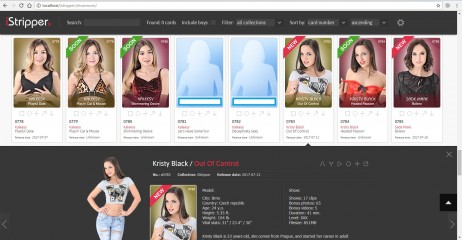
  • NEW: now the page is fully dynamic. What does it mean? It means that you don't have to reload whole page to display different content. All data and main settings are loaded just once per session, images are loaded only when they are in view (lazy loading) so now couple of things should change for better: faster loading, easier viewing, less bandwith eaten.
.
  • NEW: search option. Very useful thing. Just click on small 'loupe' icon and type something in textfield. It's also dynamic, so you don't have to hit Enter or click anything to perform search. Just type something and it will search through all collections while typing. Regular expressions are not supported, so something like "a0001 | b0123" will not work. You can search in one type of content at time. If you want to search in full images, nude pngs or videos, just switch to Control panel, select content type and go back to Search panel.
.
  • NEW: filters. You can choose if you want to search guys (VirtuaGuy) or not - use 'Include boys' option. VirtuaGuy collection is set to 'off' by default. If something will be found in several collections, you can use filter option to display all results or just selected collections.
.
  • NEW: sort option. You can use sort option to sort content (as well as search results) by card number, model name or release date. You can sort ascending or descending.
.
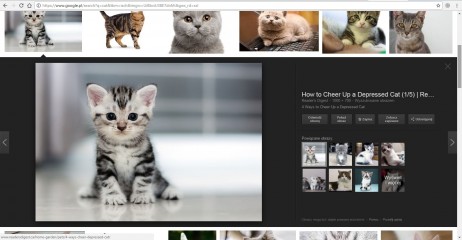
  • NEW: extra panel with additional info. This panel brings you additional info about every model and her show. My goal here was to make something similiar to Google's applet in their search engine. When you search in graphics you can click any image and this image will be opened as bigger image on dark background with few informations on the right, like in the attached picture (the one with cat). To open the panel you have to click on little square under every single card. To close it: click on X in top right corner, hit Esc on your keyboard or click again on previously selected little square. Several keys are supported: Arrow left/right - switch to previous/next model; Esc - close panel.
.
  • NEW: label "Soon" for upcoming cards. If upcoming card have no release date, but image for this card is already available, it will be labeled as "Soon" (green ribbon with white text). This option makes upcoming cards easier to spot.
.
  • NEW: label "New" for cards released at most week ago. Just to know which cards were released recently. Look for pink ribbon with white text.
.
  • UPDATE: new content type for VirtuaGirl 2 collection (VirtuaGirl Classic): videos. Videos aren't available for all VG2 cards, but for most of them.
.
  • UPDATE: settings window is removed. Last settings and ranges for each collection are automatically saved in cookies.

.
As you can see there are plenty new options, so there is bigger chance that something may be fuc... may be broken. As always let me know if you find some strange behaviours, or if something don't work properly.
If you have some ideas or if you think that something is missing, feel free to write here about it.